


You finish a few hours at the laptop, stand up, and your neck feels stuck. Your low back tightens halfway through the walk to the kitchen. By the time you’re driving from Quincy to Braintree, or heading down Route 3 toward Plymouth, your shoulders are already riding high.
This is the common experience for a lot of South Shore residents working hybrid schedules. Kitchen tables turned into offices. Spare bedrooms became workstations. Commutes, couch time, and long stretches of screen time all pile onto the same tissues. If you’ve been searching how to improve posture at desk, the answer usually isn’t to “sit up straight” and hope for the best. It’s to build a setup and a routine your body can tolerate.
Good posture is less about holding one perfect shape and more about keeping strain from building all day. A better chair helps. A better monitor position helps. Regular movement helps even more. And when pain keeps returning, a physical therapist can usually spot the specific pattern behind it faster than another generic internet checklist.
Table of Contents
- Why Your Desk Job Is Aching from Quincy to Plymouth
- Setting Up Your Desk for Success in Hanover and Beyond
- Corrective Exercises You Can Do at Your Desk
- Building Movement into Your Workday
- Beyond the Basics Common Posture Mistakes to Avoid
- When to See a Physical Therapist on the South Shore
- Your Posture Questions Answered
Why Your Desk Job Is Aching from Quincy to Plymouth
A desk job can bother your body even when you’re not doing anything that feels strenuous. The problem is repetition. Hours of looking slightly down, reaching slightly forward, and staying still just long enough to stiffen up.
That pattern shows up all over the South Shore. A hybrid worker in Milton spends half the day at a dining room chair. A small business owner in Duxbury answers emails from a laptop between meetings. A commuter gets through a full workday, then sits again in traffic. None of that seems dramatic in the moment. Your neck, shoulders, and back usually disagree by late afternoon.
The scope of the issue is more significant than generally understood. Poor posture impacts 86% of office workers, and many develop forward head posture where the head shifts 2 to 3 inches forward, effectively doubling strain on the neck muscles, according to data on desk-job postural strain and standing desk outcomes. The same source notes that standing desks can cut upper back and neck pain by 54% and immediately improve posture angles.
Poor desk posture rarely starts as a major injury. It usually starts as a low-grade daily irritation that keeps getting repeated.
If that sounds familiar, it helps to look at posture as a habit loop, not a character flaw. Slouching isn't typically due to laziness, but rather an adaptation to a screen that’s too low, a chair that doesn’t support them, and a workday that doesn’t invite movement.
A lot of the basic fixes are simple and worth trying early. If you want another practical outside resource, this practical guide on how to improve posture at work covers several everyday adjustments in a straightforward way.
When symptoms keep circling back, it’s often because the body has settled into a more fixed pattern like rounded shoulders or forward head posture. That’s when a more targeted plan matters. If that pattern sounds like you, this page on poor posture and forward head syndrome treatment gives a local starting point for understanding what treatment can address.
Setting Up Your Desk for Success in Hanover and Beyond
You can have a motivated workday, a decent chair, and still end up with a stiff neck by 2 p.m. I see that a lot with people splitting time between a home office in Hanover, a kitchen table in Marshfield, and a long commute into Boston. The problem usually is not one bad position. It is hours spent with the same joints and muscles doing the same job.
A desk setup should make changing positions easier. That matters more than chasing one perfect posture.
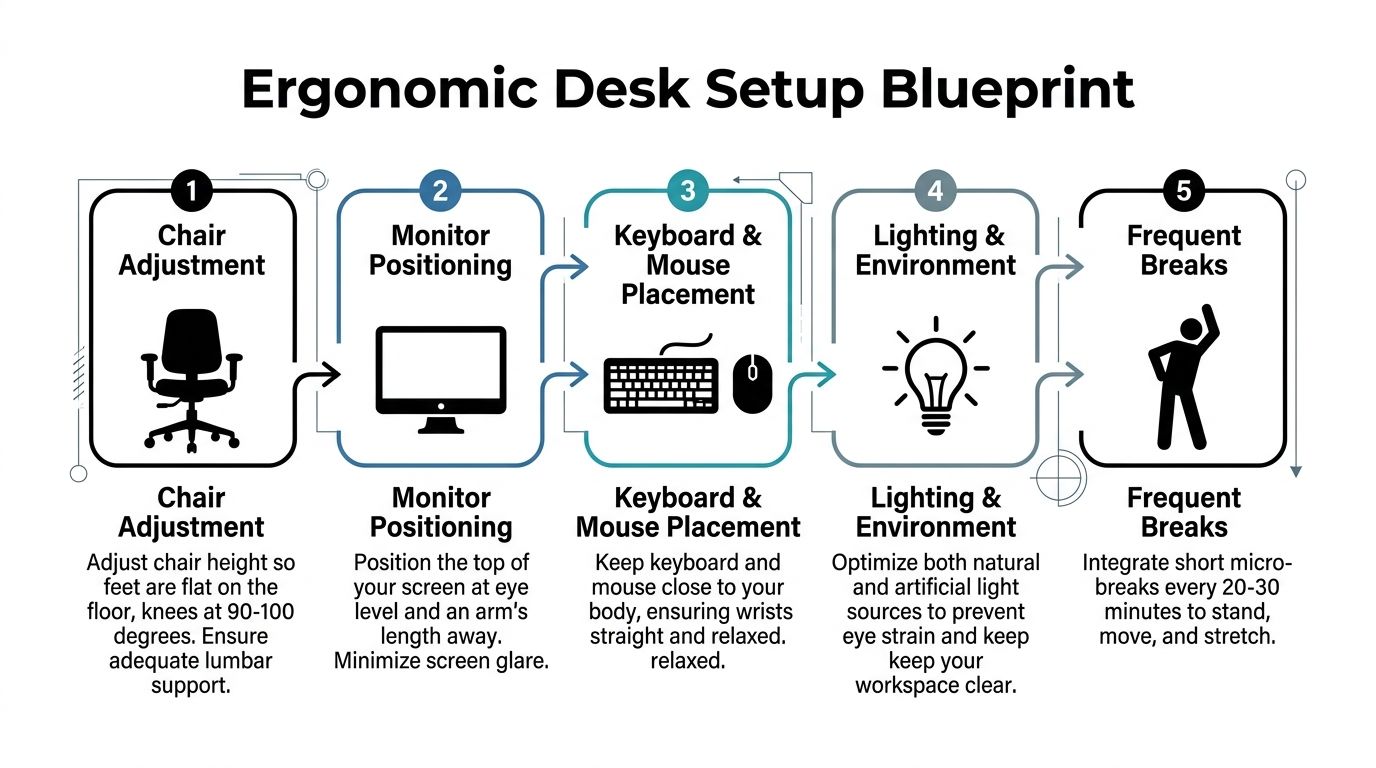
Start with the screen and chair
If your screen is too low, your head drifts forward. If your chair is too deep, too firm, or poorly shaped for your frame, you slide into a slouch to get comfortable. Your body will always find a workaround, and that workaround often shows up later as neck tension, shoulder tightness, or an aching low back.
Start with these changes:
Raise the screen
Your eyes should land near the upper portion of the monitor without dropping your chin. Laptop users usually do better with the laptop raised on books or a stand, plus an external keyboard and mouse.Set chair height from the floor up
Put your feet flat on the floor first. Then check your knees, hips, and elbows. If the desk is too high once your legs are in a better position, use a footrest or raise the chair and support the feet.Support the low back
Your low back should meet the chair instead of hanging behind it. A small lumbar pillow or rolled towel works well if the chair back is flat.Bring the keyboard and mouse closer
Reaching forward all day keeps the shoulders working in the background. Keep your elbows close to your sides and your wrists relaxed.
Build a setup you can actually use
Home offices across the South Shore are rarely built like clinic treatment rooms. People work from guest rooms, counters, and spare corners. A useful setup is one you can repeat Monday through Friday without constantly fighting it.
Use this quick check:
- Monitor position: About an arm's length away, with the top portion of the screen near eye level
- Desk height: Low enough that the shoulders can stay relaxed while typing
- Chair contact: Back supported, with your hips all the way back in the seat
- Foot support: Feet flat on the floor or on a stable surface
- Arm support: Armrests should lightly support the elbows, not push the shoulders upward
Practical rule: If sitting tall feels like hard work after a few minutes, the workstation needs to change.
Chair choice can help, but it is rarely magic. A fancier chair will not fix a screen that is too low or a workday with no position changes. If you are comparing features, this guide on finding the best ergonomic office chairs for back pain gives a useful rundown of what affects support.
Use the desk to reduce strain, not to stay still
Sit-stand desks help some people, especially if they already notice more stiffness after long sitting. A key benefit is the ability to alternate. Sitting works for some tasks. Standing works better for others. Neither one is ideal for hours at a time.
I usually tell patients to set up two or three workable positions instead of one. That might mean upright typing for 20 to 30 minutes, a slight recline for reading, then standing for a call. Those small changes often calm symptoms better than trying to hold one corrected posture all morning.
If your upper back and neck tighten up even with a better setup, add a few stretches for sore back and neck during the workday. For people around Hanover and the rest of the South Shore, that combination usually works best. Improve the workstation, then give the body regular chances to move out of the position it just spent time in.
Corrective Exercises You Can Do at Your Desk
A strong desk setup reduces strain. It doesn’t erase it. You still need your muscles to move out of the positions they’ve been stuck in all morning.
These drills are simple enough to do between meetings, and they work well because they target the most common desk patterns. Forward head posture. Rounded shoulders. Stiff upper back. Tight hips. None of these exercises should create sharp pain. They should feel like a reset.
This is a useful visual reminder of the kind of shoulder tension many desk workers carry.

For neck tension and forward head posture
Start here if your neck feels jammed after email, video calls, or laptop work.
Chin tuck
Sit tall and gently pull your chin straight backward. Don’t tip your head down. Hold briefly, then relax. This helps reverse the common forward-head pattern.Upper trap stretch
Let one ear drift toward the same-side shoulder until you feel a stretch on the opposite side of the neck. Keep the shoulder on the stretching side relaxed.Neck reset between calls
Look straight ahead, soften your ribs, and let the back of the neck feel long. Hold that position for a few easy breaths before returning to work.
A good way to fit these in is to pair them with habits you already have. Every time you finish a call, do one set. Every time a file uploads, do one set. That keeps the exercises from turning into another task you forget.
For rounded shoulders and upper back stiffness
Shoulder discomfort at a desk usually isn’t just a shoulder issue. The upper back gets stiff, the chest gets tight, and the shoulder blades stop moving well.
Try this short sequence:
Scapular squeeze
Gently pull the shoulder blades back and slightly down. Don’t jam the chest upward. Hold briefly, then relax.Doorway chest stretch
Place your forearm on a doorway and step through gently until you feel the front of the chest open. This is useful after long typing sessions.Seated thoracic extension
Sit tall, place hands behind your head or across your chest, and gently lift through the upper back rather than arching hard through the low back.Wall angel, if space allows
Stand against a wall and move the arms slowly up and down while keeping the movement smooth and controlled.
A desk exercise should leave you looser, not exhausted. If it feels like a workout in work clothes, it’s probably too much for the middle of the day.
A lot of South Shore patients tell us they don’t need more motivation. They need shorter routines. That’s usually right. Two minutes done consistently beats a long sequence that never happens.
For hips and low back tightness
Low back pain at a desk often starts lower than people think. Tight hips, tucked pelvis, or sitting heavily on one side can all change how the back loads.
Use these if your back gets cranky after sitting or your hips feel stiff when you stand up:
Seated figure-four stretch
Cross one ankle over the opposite knee and hinge forward slightly until you feel a stretch through the hip.Seated pelvic rock
Gently tip the pelvis forward and backward while sitting. This helps you feel the difference between slumped and neutral.Sit-to-stand without using hands
If safe for you, stand up from the chair and sit back down with control. This wakes up the hips and legs, which often go quiet during long desk blocks.Standing hip flexor stretch
Step one foot back and shift forward slightly while staying tall through the trunk.
If you want a few more options for in-between-work stiffness, Peak has a helpful page on stretches for sore back and neck that fits well alongside the desk routine above.
A simple rule helps keep these exercises useful: pick one movement for your neck, one for your upper back, and one for your hips. Do them once in the morning, once midafternoon, and once when you first feel yourself getting stiff. That’s usually enough to change the day.
Building Movement into Your Workday
The biggest posture mistake isn’t slouching for a minute. It’s staying the same for too long.
That matters for South Shore residents because so many workdays now mix desk time, car time, and couch time. You might move from a home office in Norwell to a client meeting in Quincy, then spend the evening on the sidelines at youth sports or catching up on emails after dinner. Your body doesn’t care whether the stillness happened in a swivel chair or in traffic. It still adds up.
Much posture advice fails to grasp the core issue. The answer to how to improve posture at desk isn’t to lock into one rigid position. It’s to build regular change into the day.
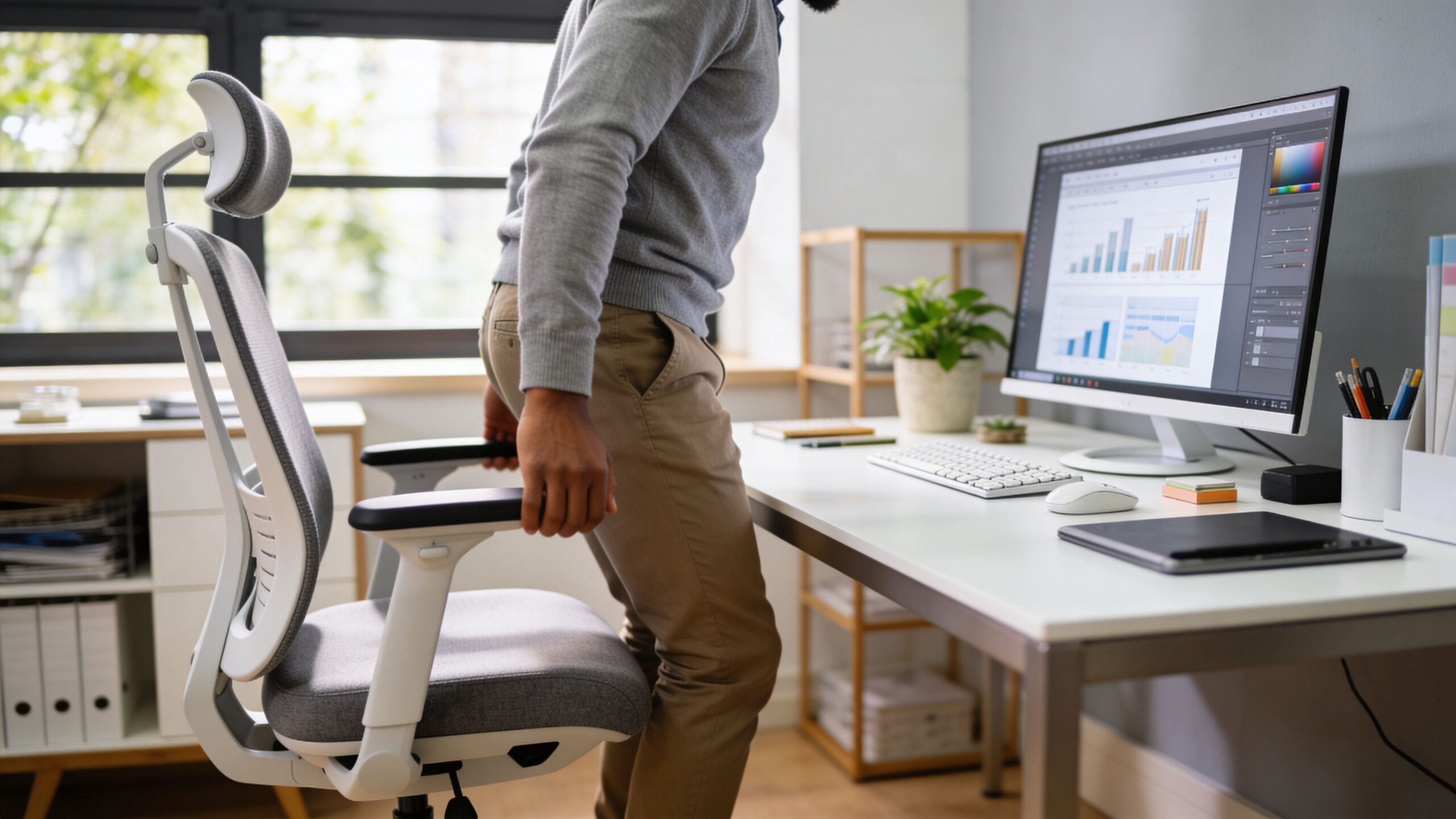
The best posture is your next posture
A randomized controlled trial of desk-based workers with low back pain found that a fixed 30-minute sitting to 15-minute standing ratio worked better than personalized sit-stand ratios for reducing lower back pain. The fixed schedule reduced worst-case pain by 1.33 points on a 10-point scale, based on this trial of sit-stand ratio optimization for lower back pain management.
That doesn’t mean everyone needs a standing desk to function. It does mean your body tends to respond well to a clear rhythm. Instead of deciding every hour whether you “should” stand, you remove the decision and follow a repeatable pattern.
A simple workday rhythm
Here’s a sample schedule that keeps movement realistic.
| Time | Activity | Duration |
|---|---|---|
| Start of work block | Sit with screen and chair reset before opening email | Brief setup |
| 30 minutes later | Stand up and work standing if available, or take a movement break | 15 minutes |
| After the standing block | Sit again and continue focused work | 30 minutes |
| Mid-morning | Walk to refill water, use stairs, or do one desk stretch sequence | Short break |
| Early afternoon | Repeat the sit-then-stand cycle | Ongoing |
| Mid-afternoon slump | Take a lap around the house or office instead of pushing through stiffness | Short break |
| End of day | Reset posture before the drive home or evening routine | Brief reset |
This works because it’s flexible enough for real life. If you can’t stand during a certain task, swap in a walk. If your office doesn’t allow easy standing work, use a timer for posture breaks and short movement intervals.
A few habits make this easier to keep:
- Tie movement to routine tasks: Stand for phone calls, walk during audio meetings, or reset posture before opening the next task.
- Use transition moments: Bathroom breaks, coffee refills, and printer trips are already built into the day.
- Keep the break small: Short movement breaks are often adopted more consistently than long exercise sessions.
You don’t need a perfect wellness routine. You need enough movement that your back, neck, and hips stop feeling trapped.
Beyond the Basics Common Posture Mistakes to Avoid
A lot of South Shore desk workers do the obvious fixes, then wonder why the same pain shows up by 3 p.m. again. The monitor is higher. The chair is better. The shoulders are no longer slumped. But the neck still tightens, the low back still aches, and the drive from Quincy, Hanover, or Plymouth still feels longer than it should.
That usually means the problem is not one bad position. It is the repeated way the body loads all day.

Stop chasing one perfect position
The 90-90-90 setup is a starting point. It is not a posture scorecard.
For some people, that position feels supported. For others, especially people working from a laptop at the kitchen counter, sharing a home office, or dealing with stiff hips after a long commuter train or car ride, forcing the same angles all day creates more tension than relief. I see that often with people who are trying hard to “sit up straight” and end up gripping through the low back and ribs.
A better target is position plus variety. Sit with support. Shift before you get stuck. Recline for part of a meeting. Move forward when a task needs precision. Stand for a stretch of work if it helps. Then sit again. Good posture at a desk is active and adjustable, not frozen.
A few mistakes show up over and over:
- Over-correcting the chest: Pulling the shoulders back hard can flare the ribs and make the low back do extra work.
- Bracing the stomach all day: Gentle support helps. Constant gripping usually leads to fatigue and shallow breathing.
- Treating standing as the upgrade: Standing desks help some people, but standing in one place for hours can irritate the back, hips, knees, and feet just as easily as prolonged sitting.
Learn what neutral pelvis feels like
This point gets missed in a lot of online posture advice.
If the pelvis stays tucked under in a slouch, the low back loses its usual curve and the upper body has to compensate. If the pelvis tips too far forward, the back can hang on passive structures and the hip flexors often stay on tension. Both patterns can feed that familiar combination of low back soreness, hip tightness, and end-of-day stiffness.
Try this in your chair:
- Roll your pelvis backward into a full slouch.
- Tip it forward into an exaggerated arch.
- Ease into the midpoint where your weight feels balanced on the sitting bones and the low back keeps a gentle curve.
That middle position is often much closer to neutral. It should feel sustainable, not stiff.
For people with chronic back pain, hip arthritis, post-surgical stiffness, or recurring pain during long workdays, finding that midpoint can take practice and feedback. A hands-on evaluation at a physical therapy clinic in Plymouth, MA can help sort out whether the issue is pelvic control, hip mobility, trunk endurance, or a mix of all three.
Small habits that keep you sore
Sometimes the desk setup is fine. The repeat habits around it are the underlying problem.
Watch for these common patterns:
- Phone cradling: Holding the phone between the ear and shoulder loads the neck quickly.
- Crossing the same leg every time: That can shift pelvic position and change how the low back and hips share the load.
- Reaching for the mouse all day: A small reach, repeated for hours, can keep the shoulder blade and upper trap working harder than they need to.
- Using a laptop off to one side: Even a slight trunk rotation, held over and over, can build neck and mid-back tension.
- Dropping into poor car posture after work: Hybrid work still includes driving. If you spend the day cleaning up desk mechanics, then sink into the steering wheel on Route 3 or on the way back from Boston, the body still ends the day compressed.
The goal is simple. Build a posture that is supported, changeable, and realistic for your day. That is what tends to hold up better than trying to maintain one perfect pose from the first email to the commute home.
When to See a Physical Therapist on the South Shore
A lot of South Shore desk workers can get through the day with a few setup changes and more movement. Others keep doing the right things and still end up with the same neck pain on a Tuesday afternoon, the same low back pinch after the drive home, or the same headache by the second Zoom block. That pattern usually means the problem is not just posture. It is how your joints, muscles, and nerves are handling the positions you repeat all day.
That is usually the point to get assessed.
If symptoms have shifted from mild stiffness to pain that is sharper, more persistent, or harder to ignore, a physical therapy evaluation makes sense. The same goes for headaches linked to neck tension, back pain that wakes you at night, pain that travels into the arm or leg, or numbness and tingling that shows up with sitting and computer work.
Signs self-correction isn’t enough
Consider scheduling an evaluation if you notice any of these:
- Pain that keeps returning: You improve your setup, stretch, feel better for a day or two, then slide back into the same cycle.
- Symptoms spreading: Neck pain starts reaching into the shoulder blade or arm, or low back pain begins moving into the hip or leg.
- Loss of motion: Turning your head, reaching overhead, standing tall after sitting, or getting out of the car feels limited.
- Workday interference: Pain is cutting into your focus, changing how long you can sit, or making you avoid parts of your job.
- Commute carryover: You feel manageable at the desk, then symptoms ramp up during the drive from Boston, on Route 3, or after sitting through another train ride.
A good PT evaluation looks at more than a posture snapshot. It checks which areas are stiff, which muscles are working too hard, which movements trigger symptoms, and which daily positions keep feeding the problem. That matters because posture is not one perfect pose. It is your ability to shift, support yourself, and tolerate the demands of your actual day.
What an evaluation usually looks like
A posture and pain evaluation is usually more hands-on and specific than people expect. Your therapist watches how you sit, stand, reach, rotate, and move between positions. They also look at your work setup, your commute, your activity level, and the timing of your symptoms. For someone working hybrid on the South Shore, that often explains more than a generic ergonomic checklist ever will.
At Peak Physical Therapy and Sports Performance, treatment may include mobility work, targeted strengthening, postural retraining, manual therapy, and a home plan that fits your schedule instead of adding another unrealistic task list. If your pain is tied to long sitting, shoulder blade control, hip stiffness, or trunk endurance, the plan should reflect that. If you need local care, the physical therapy clinic in Plymouth, MA is one example of where that kind of evaluation starts nearby.
The goal is not to hold yourself rigidly upright all day. The goal is to move better, tolerate desk work with less strain, and understand why your symptoms keep showing up in the first place.
Your Posture Questions Answered
How long does it take to improve desk posture
You may notice some early relief once the desk setup improves and movement becomes more regular. Lasting change takes longer because your body has to learn a different default. If your symptoms have been around for a while, expect progress to come from consistency rather than one big fix.
Do posture braces work
They can work as a short-term reminder. They usually don’t solve the underlying issue on their own. If a brace makes you more aware of slumping for brief periods, that can be useful. If you rely on it all day, you’re not really teaching your body how to move and support itself better.
What if I can’t afford a full ergonomic setup
Start with the basics. Raise the laptop on books. Use a rolled towel for lumbar support. Put your feet on a sturdy box if they don’t reach the floor well. Bring the keyboard and mouse closer. A cheaper setup that fits your body is better than an expensive one used poorly.
What’s the single best thing to do during the workday
Change position before you feel stuck. That one habit prevents a lot of end-of-day pain from building in the first place.
If desk work is leaving you with nagging neck pain, back tightness, shoulder tension, or recurring headaches, book an appointment with Peak Physical Therapy and Sports Performance. With clinics across the South Shore, our team can help you figure out why your posture keeps drifting, what your body needs, and how to get back to work, commuting, and daily life with less pain.